


The conversation around AI in the enterprise has officially shifted. It is no longer just about generating text or answering basic queries; it is about scaling impact through autonomous, agentic workflows. At the recent DevCon event, Workday introduced its new Developer Agent, a tool designed to bring the power of natural language development directly into the software ecosystem.
For organizations running core HR and financial workflows, this tool provides a fast track to creating custom automation without forcing internal teams into steep learning curves. With the recent promotion and clarification of Flex Credits, this becomes relevant today.
Meeting Developers Where They Already Work
One of the most notable aspects of the Developer Agent is its frictionless deployment model. Workday integrates the Developer Agent directly into the coding editors and tools that development teams use every day. It acts as an ambient assistant within popular agentic environments, including Claude Code, Cursor, Cline, Codex and Google Antigravity.
By dropping directly into these IDEs, a developer can simply type a request in plain text such as “Build an agent that alerts finance when a department is trending to go over budget this quarter” and the tool handles the heavy lifting. It identifies the correct data points, references the proper documentation, and generates production-ready code in minutes rather than days.
Technical Architecture & Integrations
Workday is embedding its capabilities directly into the modern developer’s existing toolkit:
- Ambient Developer Experience: In addition to the proprietary Workday interface, the Developer Agent also operates natively inside popular AI-assisted coding environments
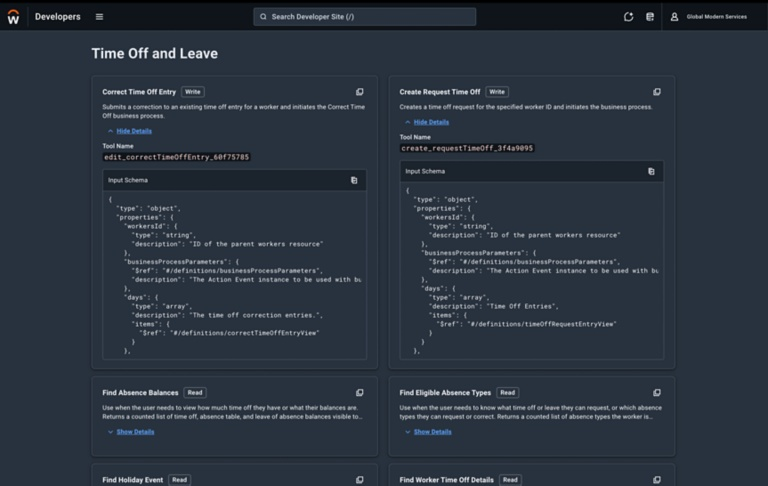
- Model Context Protocol (MCP): Workday uses MCP to expose its documentation, APIs, and data structures as “Agent-Ready Tools.” This allows external LLMs to securely “read” and understand Workday’s architecture in real time.
- Pre-Built Skills (Skills.md): The ecosystem utilizes an open standard (
Skills.md) where agents can look up and execute pre-packaged “AgentSkills” (e.g., fetching worker profiles or updating financial records) to streamline development.
Step-by-Step Developer Workflow
A practical execution flow where a developer uses an AI terminal (like Claude Code) to build a custom application:
- Natural Language Prompting: The developer initiates a task in plain text (e.g., “Look at the schema for candidate and create a tool that finds candidates with specific skills”).
- Context Assembly: The AI agent calls upon Workday’s MCP tools to read the necessary API definitions, schemas, and documentation.
- Code Generation & Testing: The agent automatically writes the integration code, runs local tests, identifies errors, and self-corrects the code until it passes.
- Deployment to Workday Extend: The finalized, operational agent is deployed directly into the client’s Workday environment.
Navigating the Pitfalls of Agent Architecture
While building autonomous agents with the Developer Agent feels remarkably intuitive, engineering teams must avoid common design flaws that can compromise performance. A primary mistake is bloating a single agent with too many responsibilities; keeping capability files hyper-focused and modular ensures that individual functions remain easy to debug and maintain.
Furthermore, using vague phrases to prompt or trigger an agent introduces the risk of unintentional activation, meaning phrasing must be precise to avoid false positives. Finally, because large language models inherently risk delivering inconsistent results, developers must define firm logic boundaries within their configuration files to keep system behaviors predictable and repeatable.
The Trust Framework: Agent Passport & Security
Because these agents operate on sensitive HR and financial data, Workday introduces a rigorous, independent verification system to ensure enterprise-grade safety:
- Independent Verification: Workday partners with third-party security leaders (specifically highlighting Cisco AI Defense) to independently evaluate and scan every custom agent.
- The Agent Passport: When an agent passes these security checks, it is issued a digital “Agent Passport.” This passport acts as an auditable certificate proving the agent is safe to run.
- Security Guardrails: The verification process explicitly tests against major vulnerabilities, ensuring compliance with frameworks like the OWASP Top 10 for LLMs, NIST AI RMF, and MITRE ATLAS. It specifically checks for risks like prompt injection and data leakage.
- Centralized Control: Admins retain a centralized dashboard where they can review an agent’s passport, see exactly what it was tested for, and instantly revoke its access if necessary.
Unlocking Value with Teamup9
Workday’s Developer Agent represents a structural shift in how enterprise value is delivered, enabling Workday Admin teams to turn institutional knowledge into action quickly. However, mapping these agentic capabilities to your unique organizational processes still requires strategic oversight and technical alignment.
At Teamup9, we specialize in helping organizations maximize their Workday ecosystem. Our team can help you leverage these new development frameworks safely, seamlessly integrating custom agents into your existing workflows while maintaining rigorous data governance.
Reach out to Teamup9 today to learn how we can help you build a secure, high-impact agentic workforce.