


For Workday administrators and partners, managing change has traditionally been a manual, high-stakes process. Moving configuration from Sandbox to Production often required significant rework, meticulous documentation, and a fair amount of “manual clicks” to ensure everything aligned perfectly.
With the release of Workday 2026R1, the landscape of configuration management is shifting. The introduction of Reusable Configuration marks a transition from viewing configuration as a one-time task to treating it as a strategic, reusable asset. This update is designed to help organizations deploy changes faster and with a much higher degree of predictability.
More Controlled and Predictable Deployments
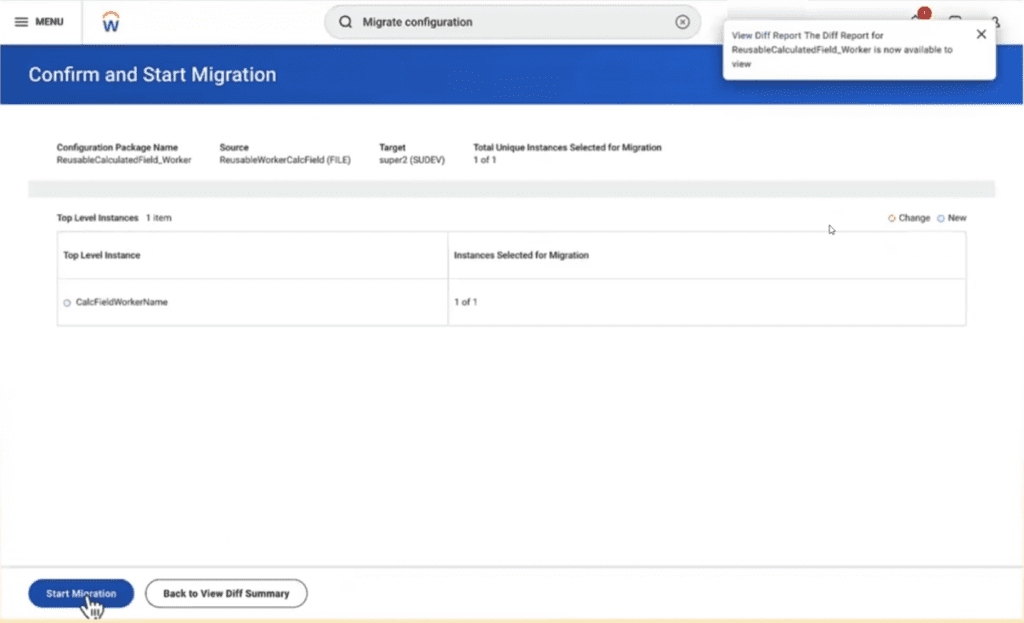
Moving a very manual task to a repeatable automation is addressing a number of items: Customers gain clearer visibility into what configuration will change before it is applied. And it allows for stronger change governance and reduces deployment risk. It also increases the team’s productivity significantly.
Built-In Validation and Risk Mitigation
One of the most common hurdles in any Workday migration is the “missing dependency.” Forgetting to include a specific calculated field or a custom organization can stall a deployment or cause errors in the production environment.
Workday 2026R1 addresses this through built-in validation and dependency awareness. Before a deployment is finalized, the system automatically identifies all necessary dependencies and validates the readiness of the package.
- Transparency: You gain a clear view of exactly what will change before the “apply” button is pressed.
- Confidence: Automatic checks ensure that the configuration is compatible with the destination environment.
- Governance: Stronger visibility supports audit requirements and internal control standards.
Redefining Deployments with Parameterized Configuration
At the heart of this update is the ability to create parameterized configuration packages. Historically, moving a business process or a reporting structure meant bringing over a rigid set of data that might not perfectly fit the destination environment.
Now, Workday allows organizations to define configuration once and deploy it repeatedly across various tenants—including Sandbox, Preview, and Production. The “parameterized” aspect means you can adjust specific values at the time of deployment. This flexibility accounts for environment-specific variables without requiring a complete rebuild of the package, significantly reducing manual effort and the potential for human error.
The Business Impact: Efficiency and Scalability
The move toward reusable assets isn’t just a technical improvement; it’s a business accelerator. By streamlining the path from development to live operations, organizations can realize several key benefits:
- Faster Time to Value: New features and optimizations can be moved into the hands of employees and managers in days rather than weeks.
- Reduced Operational Risk: Automated validation minimizes post-deployment “fixes” and ensures system stability.
- Consistency Across Tenants: Ensuring that your Preview environment is an exact mirror of what will go into Production is now much simpler, leading to more accurate testing.
- Support for Agility: Whether you are navigating a global expansion, a merger, or a phased rollout, Reusable Configuration allows you to scale your Workday footprint without a linear increase in administrative complexity.
Maximizing Your Workday Investment with Teamup9
While the 2026R1 Reusable Configuration feature provides the tools for better change management, the true value lies in how those tools are integrated into your broader HR and Finance strategy. Adopting a “reusable” mindset requires a shift in how you document and package your internal processes.
At Teamup9, we specialize in helping organizations navigate these transitions. We understand that every tenant is unique, and our team of experts is ready to help you audit your current migration workflows to take full advantage of these new capabilities. By partnering with an experienced team, you ensure that your Workday environment remains lean, efficient, and ready for whatever the next release brings.